
OpenClaw
Web: https://openclaw.ai/
2026.8.2
module load ceuadmin/node/24.15.0
export version=2026.8.2
export BASE="$CEUADMIN/OpenClaw/$version"
npm view openclaw versions
npm install -g "openclaw@$version" --prefix "$BASE"
# Extensions
module load ceuadmin/OpenClaw/$version
export OPENCLAW_STATE_DIR="$BASE/state"
export OPENCLAW_CONFIG_PATH="$BASE/config.json"
openclaw plugins install ollama
2026.4.15
# OpenClaw/2026.4.15
module load ceuadmin/node/24.15.0
export version=2026.4.15
export BASE="$CEUADMIN/OpenClaw/$version"
npm view openclaw versions
npm install -g "openclaw@$version" --prefix "$BASE"
# Extensions
module load ceuadmin/OpenClaw/$version
export OPENCLAW_STATE_DIR="$BASE/state"
export OPENCLAW_CONFIG_PATH="$BASE/config.json"
openclaw plugins install ollama
from which one finds
- $BASE/lib/node_modules/openclaw/dist/plugin-sdk/extensions/ollama
- $BASE/lib/node_modules/openclaw/dist/extensions/ollama
It turns out node/22.16.0 is a bit too old, so we resort to 24.15.0 (LTS).
npm warn EBADENGINE Unsupported engine {
npm warn EBADENGINE   package: 'undici@8.0.2',
npm warn EBADENGINE   required: { node: '>=22.19.0' },
npm warn EBADENGINE   current: { node: 'v22.16.0', npm: '10.9.2' }
npm warn EBADENGINE }
npm warn deprecated inflight@1.0.6: This module is not supported, and leaks memory. Do not use it. Check out lru-cache if you want a good and tested way to coalesce async requests by a key value, which is much more comprehensive and powerful.
npm warn deprecated npmlog@5.0.1: This package is no longer supported.
npm warn deprecated rimraf@3.0.2: Rimraf versions prior to v4 are no longer supported
npm warn deprecated are-we-there-yet@2.0.0: This package is no longer supported.
npm warn deprecated glob@7.2.3: Old versions of glob are not supported, and contain widely publicized security vulnerabilities, which have been fixed in the current version. Please update. Support for old versions may be purchased (at exorbitant rates) by contacting i@izs.me
npm warn deprecated gauge@3.0.2: This package is no longer supported.
npm warn deprecated node-domexception@1.0.0: Use your platform's native DOMException instead
npm warn deprecated tar@6.2.1: Old versions of tar are not supported, and contain widely publicized security vulnerabilities, which have been fixed in the current version. Please update. Support for old versions may be purchased (at exorbitant rates) by contacting i@izs.me
Setup
It has a flavour of settings for libvips.
source ~/rds/software/py3.11/bin/activate
module load ceuadmin/libvips/8.18.0
module load ceuadmin/node/22.16.0
npm install -g node-gyp --prefix "$CEUADMIN/OpenClaw/2026.3.8"
npm install -g openclaw --prefix "$CEUADMIN/OpenClaw/2026.3.8"
so that the openclaw binary and packages are installed according to –prefix.
Alternatively,
NPM_CONFIG_PREFIX=$CEUADMIN/OpenClaw/2026.3.8 curl -fsSL https://openclaw.ai/install.sh | bash
# npm install -g openclaw --build-from-source --prefix "$CEUADMIN/OpenClaw/2026.3.8"
OpenClaw is effectively installed as a node modules sitting with node/22.16.0 as a matter of convenience.
Usage
module load ceuadmin/OpenClaw
openclaw --help
which gives,
OpenClaw 2026.3.8 (3caab92)

🦞 OpenClaw 2026.3.8 (3caab92) — I'm the middleware between your ambition and your attention span.

Usage: openclaw [options] [command]

Options:
  --dev                Dev profile: isolate state under ~/.openclaw-dev, default gateway port 19001, and shift derived ports (browser/canvas)
  -h, --help           Display help for command
  --log-level <level>  Global log level override for file + console (silent|fatal|error|warn|info|debug|trace)
  --no-color           Disable ANSI colors
  --profile <name>     Use a named profile (isolates OPENCLAW_STATE_DIR/OPENCLAW_CONFIG_PATH under ~/.openclaw-<name>)
  -V, --version        output the version number

Commands:
  Hint: commands suffixed with * have subcommands. Run <command> --help for details.
  acp *                Agent Control Protocol tools
  agent                Run one agent turn via the Gateway
  agents *             Manage isolated agents (workspaces, auth, routing)
  approvals *          Manage exec approvals (gateway or node host)
  backup *             Create and verify local backup archives for OpenClaw state
  browser *            Manage OpenClaw's dedicated browser (Chrome/Chromium)
  channels *           Manage connected chat channels (Telegram, Discord, etc.)
  clawbot *            Legacy clawbot command aliases
  completion           Generate shell completion script
  config *             Non-interactive config helpers (get/set/unset/file/validate). Default: starts setup wizard.
  configure            Interactive setup wizard for credentials, channels, gateway, and agent defaults
  cron *               Manage cron jobs via the Gateway scheduler
  daemon *             Gateway service (legacy alias)
  dashboard            Open the Control UI with your current token
  devices *            Device pairing + token management
  directory *          Lookup contact and group IDs (self, peers, groups) for supported chat channels
  dns *                DNS helpers for wide-area discovery (Tailscale + CoreDNS)
  docs                 Search the live OpenClaw docs
  doctor               Health checks + quick fixes for the gateway and channels
  gateway *            Run, inspect, and query the WebSocket Gateway
  health               Fetch health from the running gateway
  help                 Display help for command
  hooks *              Manage internal agent hooks
  logs                 Tail gateway file logs via RPC
  memory *             Search and reindex memory files
  message *            Send, read, and manage messages
  models *             Discover, scan, and configure models
  node *               Run and manage the headless node host service
  nodes *              Manage gateway-owned node pairing and node commands
  onboard              Interactive onboarding wizard for gateway, workspace, and skills
  pairing *            Secure DM pairing (approve inbound requests)
  plugins *            Manage OpenClaw plugins and extensions
  qr                   Generate iOS pairing QR/setup code
  reset                Reset local config/state (keeps the CLI installed)
  sandbox *            Manage sandbox containers for agent isolation
  secrets *            Secrets runtime reload controls
  security *           Security tools and local config audits
  sessions *           List stored conversation sessions
  setup                Initialize local config and agent workspace
  skills *             List and inspect available skills
  status               Show channel health and recent session recipients
  system *             System events, heartbeat, and presence
  tui                  Open a terminal UI connected to the Gateway
  uninstall            Uninstall the gateway service + local data (CLI remains)
  update *             Update OpenClaw and inspect update channel status
  webhooks *           Webhook helpers and integrations

Examples:
  openclaw models --help
    Show detailed help for the models command.
  openclaw channels login --verbose
    Link personal WhatsApp Web and show QR + connection logs.
  openclaw message send --target +15555550123 --message "Hi" --json
    Send via your web session and print JSON result.
  openclaw gateway --port 18789
    Run the WebSocket Gateway locally.
  openclaw --dev gateway
    Run a dev Gateway (isolated state/config) on ws://127.0.0.1:19001.
  openclaw gateway --force
    Kill anything bound to the default gateway port, then start it.
  openclaw gateway ...
    Gateway control via WebSocket.
  openclaw agent --to +15555550123 --message "Run summary" --deliver
    Talk directly to the agent using the Gateway; optionally send the WhatsApp reply.
  openclaw message send --channel telegram --target @mychat --message "Hi"
    Send via your Telegram bot.

Docs: docs.openclaw.ai/cli
Integration with Ollama
URL, https://docs.ollama.com/integrations/openclaw
The official news on OpenClaw with ollama involves ollama launch openclaw where OpenClaw tries to install a systemd service, which
is not allowed on HPC login nodes, so we start manually.
module load ceuadmin/ollama
ollama serve > /dev/null 2>&1 &
until ollama list; do
  sleep 1
done
module load ceuadmin/OpenClaw
openclaw onboard
openclaw gateway &
where openclaw onboard sets up the environment (from ollama 0.18, it is official provider for OpenClaw, i.e., openclaw onboard --auth-choice ollama) and our instance of openclaw gateway gives,
🦞 OpenClaw 2026.3.8 (3caab92) — Your personal assistant, minus the passive-aggressive calendar reminders.

15:53:10 [canvas] host mounted at http://127.0.0.1:18789/__openclaw__/canvas/ (root /home/jhz22/.openclaw/canvas)
15:53:10 [heartbeat] started
15:53:10 [health-monitor] started (interval: 300s, startup-grace: 60s, channel-connect-grace: 120s)
15:53:10 [gateway] agent model: ollama/minimax-m2.5:cloud
15:53:10 [gateway] listening on ws://127.0.0.1:18789 (PID 322663)
15:53:10 [gateway] log file: /tmp/openclaw/openclaw-2026-03-11.log
15:53:10 [browser/server] Browser control listening on http://127.0.0.1:18791/ (auth=token)
Surely, these are useful for letting web browsers point to the appropriate ports.
Now we try ollama launch openclaw again,
This will modify your OpenClaw configuration:
  /home/jhz22/.openclaw/openclaw.json
Backups will be saved to /rds/user/jhz22/hpc-work/work/ollama-backups/

Added minimax-m2.5:cloud to OpenClaw

Launching OpenClaw with minimax-m2.5:cloud...

Security

  OpenClaw can read files and run actions when tools are enabled.
  A bad prompt can trick it into doing unsafe things.

  Learn more: https://docs.openclaw.ai/gateway/security

I understand the risks. Continue?

   Yes    No
  ✓ Installed web search plugin

Preparing your assistant — this may take a moment...

17:54:21 [reload] config change detected; evaluating reload (tools.web, plugins)
17:54:21 [reload] config change requires gateway restart (plugins)
17:54:21 [gateway] signal SIGUSR1 received
17:54:21 [gateway] received SIGUSR1; restarting
17:54:56 [gateway] shutdown timed out; exiting without full cleanup
  Warning: gateway did not come back after restart
Starting gateway...

✓ OpenClaw is running

  Open the Web UI:
    http://localhost:18789/#token=ollama

  Quick start:
    /help             see all commands
    openclaw configure --section channels   connect WhatsApp, Telegram, etc.
    openclaw skills                         browse and install skills

  The OpenClaw gateway is running in the background.
  Stop it with: openclaw gateway stop


🦞 OpenClaw 2026.3.8 (3caab92) — Half butler, half debugger, full crustacean.

 openclaw tui - ws://127.0.0.1:18789 - agent main - session main

 session agent:main:main


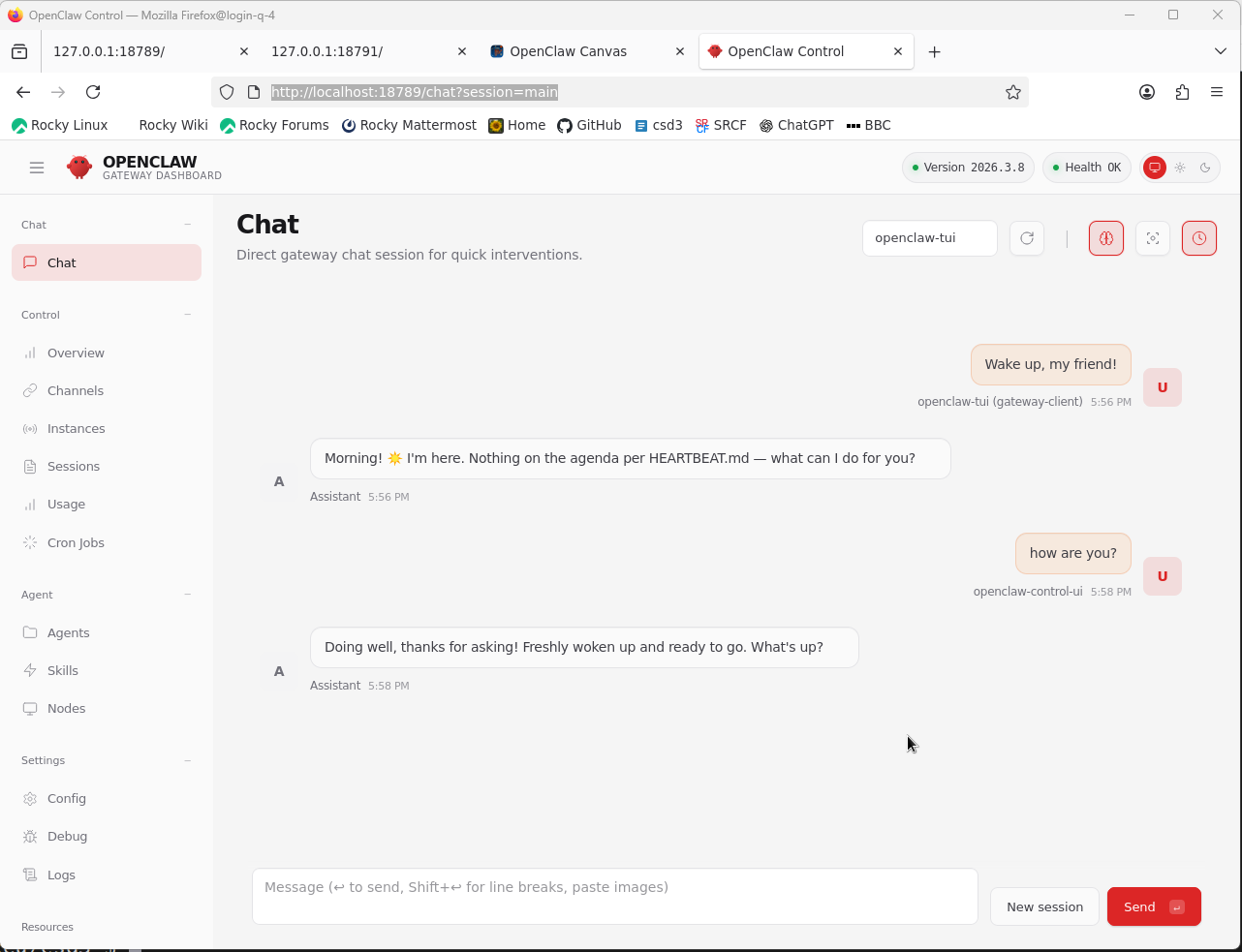
 Wake up, my friend!


 Morning! ☀️ I'm here. Nothing on the agenda per HEARTBEAT.md — what can I do for you?


 how are you?


 Doing well, thanks for asking! Freshly woken up and ready to go. What's up?
 connected | idle
 agent main | session main (openclaw-tui) | ollama/minimax-m2.5:cloud | think low | tokens 9.3k/205k (5%)
Note that additionally, we have
# connect WhatsApp, Telegram, etc.
openclaw configure --section channels
# browse and install skills
openclaw skills
# start a specific model
ollama launch openclaw --model kimi-k2.5:cloud
ollama launch openclaw --model gemma4:31b-cloud
ollama launch openclaw --model glm-5.1:cloud
The web UI http://localhost:18789/#token=ollama (or http://localhost:18789/chat?session=main) actually provides a gateway dashboard shown below, which is more desirable.
MiniMax-M2.7
This model is designed to excel at completing end-to-end tasks in software engineering and office productivity while improving its character and emotional intelligence.
M2.7 is also good at self-improvement using data from the web. Start the model with ollama launch openclaw --model minimax-m2.7:cloud, or when OpenClaw is running, /model ollama/minimax-m2.7:cloud. An exemplar use of self-improvement and research can be done with
Teach yourself how to write financial research reports by studying examples from top analysts. Write a PPT presentation and Word document report on TSMC based on their latest earnings. Save your research framework as a skill so future reports follow the same process.
To launch an agent non-interactively (–yes),
ollama launch openclaw \
--model minimax-m2.7:cloud \
--yes -- agent \
--agent main \
--local \
--message "Prepare a pre-read for my next meeting"
ClawHub
Web, https://clawhub.ai/
Some notable skills are liisted below,
module load ceuadmin/node/24.15.0
npx clawhub@latest install self-improving-agent
npx clawhub@latest install tavily-search
npx clawhub@latest install gog
npx clawhub@latest install github
npx clawhub@latest install summarize
npx clawhub@latest install agent-browser
npx clawhub@latest install find-skills
Somehow the installation is destined to skills/skills, nevertheless can be reset manually by mving skills to the right place, e.g.,
$ npx clawhub@latest install self-improving-agent

✔ OK. Installed self-improving-agent -> /usr/local/Cluster-Apps/ceuadmin/OpenClaw/2026.4.15/lib/node_modules/openclaw/skills/skills/self-improving-agent
16:58 jhz22@login-q-1 /usr/local/Cluster-Apps/ceuadmin/OpenClaw/2026.4.15/lib/node_modules/openclaw/skills $ openclaw skills list

🦞 OpenClaw 2026.4.15 (041266a) — I've survived more breaking changes than your last three relationships.

Skills (1/1 ready)
┌──────────┬──────────────────────┬──────────────────────────────────────────────────────────────────────────────────────────┬──────────────────┐
│ Status   │ Skill                │ Description                                                                              │ Source           │
├──────────┼──────────────────────┼──────────────────────────────────────────────────────────────────────────────────────────┼──────────────────┤
│ ✓ ready  │ 📦 self-improvement  │ Captures learnings, errors, and corrections to enable continuous improvement. Use when:  │ openclaw-bundled │
│          │                      │ (1) A command or operation fails unexpectedly, (2) User corrects Claude ('No, that's     │                  │
│          │                      │ wrong...', 'Actually...'), (3) User requests a capability that doesn't exist, (4) An     │                  │
│          │                      │ external API or tool fails, (5) Claude realizes its knowledge is outdated or incorrect,  │                  │
│          │                      │ (6) A better approach is discovered for a recurring task. Also review learnings before   │                  │
│          │                      │ major tasks.                                                                             │                  │
└──────────┴──────────────────────┴──────────────────────────────────────────────────────────────────────────────────────────┴──────────────────┘

Tip: use `openclaw skills search`, `openclaw skills install`, and `openclaw skills update` for ClawHub-backed skills.

$ cd /usr/local/Cluster-Apps/ceuadmin/OpenClaw/2026.4.15/lib/node_modules/openclaw/skills
$ mv skills/self-improving-agent/ .
$ rmdir skills
$ openclaw skills list
$ cd -